In order to increase the performance of file synchronization operations, SyncBreeze provides the ability to synchronize files using multiple,
parallel file synchronization streams. Multi-Stream file synchronization significantly improves file synchronization performance when synchronizing
large amounts of files between multiple disks, NAS storage devices or enterprise storage systems.
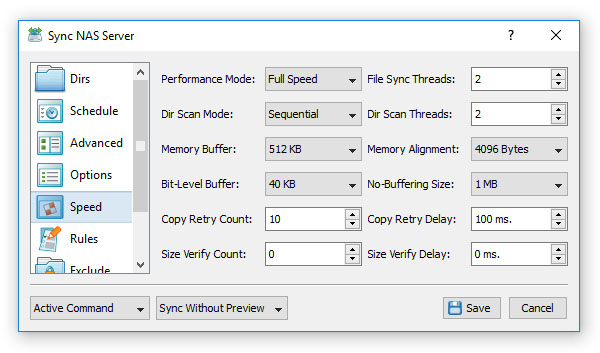
In order to enable multi-stream file synchronization for a sync command, open the file sync command dialog, select the 'Speed' tab and set an appropriate
number of file synchronization threads. Take into account that multi-stream file synchronization is optimized for SSD disks, multi-disk, RAID and networked
configurations and it is not recommended to use when the source and destination directories are located on the same mechanical hard disk.
- Performance Mode - allows one to intentionally slow down file sync operations
- File Sync Threads - sets the number of parallel file sync streams
- Dir Scan Mode - sets the 'Sequential' or 'Parallel' directory scanning mode
- Dir Scan Threads - sets the number of parallel directory scanning streams
- Memory Buffer - controls the size of the memory buffer for each sync stream
- Memory Alignment - controls the alignment of the memory buffer
- Bit-Level Buffer - controls the bit-level file sync window size
- No-Buffering Size - sets the file size threshold for no-buffering operations
- Copy Retry Count - sets the maximum number of file copy retries
- Copy Retry Delay - sets the delay between file copy retries
In addition, users required to synchronize files on running, production systems are provided with the ability to intentionally slow down file synchronization
operations thus minimizing the performance impact on running applications. In order to change the speed of a file synchronization command, open the command dialog,
select the 'Speed' tab and select an appropriate performance mode in the 'Performance Mode' combo box.
Finally, SyncBreeze provides a large number of file copy performance tuning options allowing one to control the file copy mode, the memory buffer size, memory alignment,
the bit-level sync window size, the no-buffering file size threshold, the file copy retry count and the file copy retry delay.


