|
|
|
|
Excluding Specific Subdirectories from Synchronization Process
Sometimes, it may be required to exclude one or more subdirectories from the file synchronization process. For example, if you need to synchronize two directories excluding one or two special subdirectories, you may specify the top level directories as the source and destination directories and add the subdirectories that should be skipped to the exclude list. 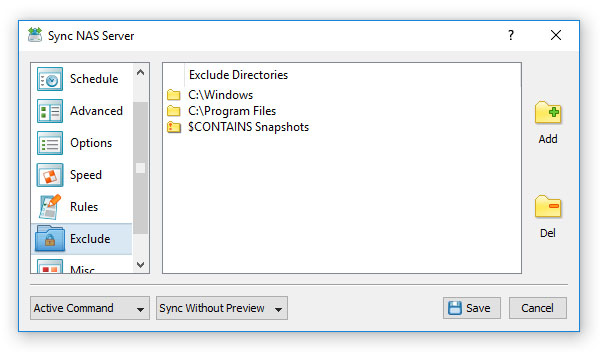
In order to add one or more directories to the exclude list, open the file synchronization command dialog, select the 'Exclude' tab and press the 'Add' button. All files and subdirectories located in the specified exclude directory will be excluded from the file synchronization process. In addition, advanced users are provided with a number of exclude directories macro commands allowing one to exclude multiple directories using a single macro command. SyncBreeze provides the following exclude directories macro commands:
For example, the exclude macro command '$CONTAINS Temporary Files' will exclude all directories with 'Temporary Files' at any place in the full directory path and the exclude macro command '$REGEX \.(TMP|TEMP)$' will exclude all directories ending with '.TMP' or '.TEMP'.
|
SyncBreeze News
|